I've noticed that more and more of my "media experiences" are streaming from the internet. With the help of Apple TV or the wifi connection in our Blu-Ray player, we rent movies from iTunes or Amazon Instant Video. Although I have local mp3 copies of most of my music, I do most of my music listening from two cloud sources, Amazon Cloud or Apple's iCloud. Sometimes for variety or laziness I will stream music from Pandora or iTunes Radio. I even stream pictures of my granddaughter from my daughter's iPhone (Apple's shared photostream).
Now I've started "streaming books." For several years, I've been doing most of my reading with Kindle e-books, buying several a month from Amazon. This is convenient but somewhat wasteful, since I read most books only once, and Kindle books cannot be shared or sold. Books are very small files compared to video or music, and they usually download in seconds. This also means that books could easily be "streamed," i.e., read directly over the web, once someone comes up with a business model to support this.
Now someone has, a company called Scribd ("the world's digital library") that's been around for years as a document sharing site, mainly for free documents (I have long had my Orbiter tutorial book Go Play In Space on Scribd for free PDF download). I haven't really looked at Scribd for a long time, but it's clear that they have been busy, and they have expanded into "non-free" books. Their latest thing is a subscription service which gives you online reading access to many commercial e-books for a flat rate of $8.99 a month. It's currently limited to only a few publishers, and mainly "back catalog" books, with relatively few current best sellers, similar in that respect to Netflix for movies.They currently offer over 100,000 titles, and they are working to add publishers, so I'm sure this number will increase over time.
They have a 30 day free trial, so I'm trying it. I'm pretty sure I will continue, because I have already found at least 10 books that I have previously considered buying on Kindle, as well as a dozen more that are new finds. My idea is that rather than buying 2-4 books a month on Kindle (for maybe $20+ a month), I'll probably read a couple of Scribd books and buy maybe 1-2 Kindle books if they aren't available on Scribd. It doesn't bother me that I won't "own" those books (I'm guessing I don't technically own my Kindle books either, only a license to download and read them whenever I want). I'm OK with the "paid borrowing" model, and Scribd allows you to download up to 10 books onto mobile devices for offline reading. The Scribd app for iOS works really well on iPhone and iPad, similar in most respects to the Kindle app. Since $8.99 is less than the typical cost for a single Kindle book, Scribd will be a good deal even if it only keeps me from buying one Kindle book a month. This makes me wonder how long it will be before Amazon or Google buys Scribd (maybe they will wait a couple of months and see how the subscription service does).
So I like this. Now if I could only eliminate my real book bottleneck - the fact that I can still only read one book at a time, and that there are still only 24 hours in a day. Severely limited mental bandwidth! As soon as they invent a multi-threaded brain, I'm ready to upgrade.
Space flight, simulators, astronomy, books, flying, music, science, education: whatever the obsession of the moment might happen to be.
Showing posts with label web. Show all posts
Thursday, December 26, 2013
Saturday, February 19, 2011
From Bozo to Watson
I’m right on the cusp between insanely busy and merely crazy busy at work. So I thought I would take a breath and write a blog post, inspired by an amazing app I just bought for the iPod Touch.
Wikipedia may have its faults, with user-created content that often needs to be taken with a grain of skepticism. On the other hand, if you have an internet connection, it’s an incredibly broad collection of entry-level (and often in-depth) articles on just about anything you can think of. But what if you don’t have an internet connection? That may seem like a rare condition for many of us, but when I wrote this, I was on an airplane with no Wifi or mobile phone signal. Back on the ground, I walk around with an iPod Touch which provides excellent web access whenever I have a Wifi signal. I also have a BlackBerry “smart phone” which is great for email and which theoretically provides web access whenever I have a 3G signal. I say theoretically because the BlackBerry’s web browser totally sucks – it is slow and unable to load most web sites because it says they are “too big.” What’s an information junky to do?
The solution: clear 3 GB of space from my iPod Touch and spend $10 on an app called Wikipedia Offline, and voila, now I’ve got the whole English language Wikipedia in my pocket. More precisely, I have the main text for the entire Wikipedia as of September 2010. By default there are no pictures, though when you are online, you can download the latest version of any article and optionally save it with pictures (as I have shown here - you can also touch the globe button to display the full online version of the article you are viewing). The links to other Wikipedia articles are in there, as are many web links, but none of the “editorial” material that might help you judge whether the information is reliable or not.
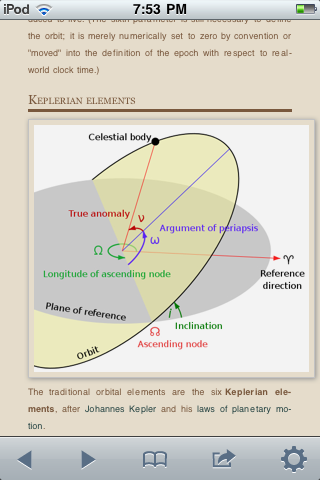
Other than those limitations, it’s pretty much all in there, from Bozo the Clown to Watson (the AI program that recently defeated two human Jeopardy game show champions – I updated the article to include recent information on that televised match). And everything in between (A, X,Y,and Z entries are in there too). Orbital elements. Orbiter. Fluffernutter sandwiches. Jayne Mansfield (she did die in car accident, but she was not decapitated). Elton John. A wide range of obscure musical acts (not me, I’m too obscure even for Wikipedia), albums, and movies. Battle of Britain (battle, movie, flight sim, airfields, memorial, etc., etc.).
How is this possible? I mean, 3 gigabytes is a lot of data, and the file is heavily and cleverly compressed. But jeeze. The first movie on my flight was the recent animated film Megamind so I looked it up. It’s in there, with cast and plot summary, although it is listed as forthcoming since the main database is from September 2010. This whole offline Wikipedia thing is really quite astounding.
Wikipedia may have its faults, with user-created content that often needs to be taken with a grain of skepticism. On the other hand, if you have an internet connection, it’s an incredibly broad collection of entry-level (and often in-depth) articles on just about anything you can think of. But what if you don’t have an internet connection? That may seem like a rare condition for many of us, but when I wrote this, I was on an airplane with no Wifi or mobile phone signal. Back on the ground, I walk around with an iPod Touch which provides excellent web access whenever I have a Wifi signal. I also have a BlackBerry “smart phone” which is great for email and which theoretically provides web access whenever I have a 3G signal. I say theoretically because the BlackBerry’s web browser totally sucks – it is slow and unable to load most web sites because it says they are “too big.” What’s an information junky to do?
The solution: clear 3 GB of space from my iPod Touch and spend $10 on an app called Wikipedia Offline, and voila, now I’ve got the whole English language Wikipedia in my pocket. More precisely, I have the main text for the entire Wikipedia as of September 2010. By default there are no pictures, though when you are online, you can download the latest version of any article and optionally save it with pictures (as I have shown here - you can also touch the globe button to display the full online version of the article you are viewing). The links to other Wikipedia articles are in there, as are many web links, but none of the “editorial” material that might help you judge whether the information is reliable or not.
Other than those limitations, it’s pretty much all in there, from Bozo the Clown to Watson (the AI program that recently defeated two human Jeopardy game show champions – I updated the article to include recent information on that televised match). And everything in between (A, X,Y,and Z entries are in there too). Orbital elements. Orbiter. Fluffernutter sandwiches. Jayne Mansfield (she did die in car accident, but she was not decapitated). Elton John. A wide range of obscure musical acts (not me, I’m too obscure even for Wikipedia), albums, and movies. Battle of Britain (battle, movie, flight sim, airfields, memorial, etc., etc.).
How is this possible? I mean, 3 gigabytes is a lot of data, and the file is heavily and cleverly compressed. But jeeze. The first movie on my flight was the recent animated film Megamind so I looked it up. It’s in there, with cast and plot summary, although it is listed as forthcoming since the main database is from September 2010. This whole offline Wikipedia thing is really quite astounding.
Saturday, October 02, 2010
CK12.org FlexBooks - Very Cool!
I stumbled on this while looking through Amazon's list of free e-books for Kindle. I've gotten some really amazing free books since I started using the Kindle apps on my iPod Touch and PC, so I sometimes check. Many of the free ones are public domain books, classics and others, but sometimes you find recent books that publishers are giving away to promote an author or a series (this is how I discovered Naomi Novik's great "Napoleonic Wars with dragons" Temeraire series).
This time I found some interesting free science textbooks from something called ck12.org. I downloaded several (earth science, "people's physics," nanotechnology, calculus, biology) and started reading one on "21st century physics" that is really interesting and well written*, with a sort of dialog format on subjects including gravitation, nuclear energy, particle physics, biophysics (medical imaging), etc. This is apparently intended to supplement basic physics topics found in standard textbooks with updated material on diverse, interesting topics and many web links. But who is offering this? I found this on the web site:
* the "well written" part varies by topic, with each chapter of this book written by a different author. I just read a chapter on on nanoscience that has several serious errors that completely change the meaning of some sentences. Textbooks need editors, even if they are free electronic textbooks.
This time I found some interesting free science textbooks from something called ck12.org. I downloaded several (earth science, "people's physics," nanotechnology, calculus, biology) and started reading one on "21st century physics" that is really interesting and well written*, with a sort of dialog format on subjects including gravitation, nuclear energy, particle physics, biophysics (medical imaging), etc. This is apparently intended to supplement basic physics topics found in standard textbooks with updated material on diverse, interesting topics and many web links. But who is offering this? I found this on the web site:
CK-12 Foundation is a non-profit organization with a mission to reduce the cost of textbook materials for the K-12 market both in the U.S. and worldwide. Using an open-content, web-based collaborative model termed the "FlexBook," CK-12 intends to pioneer the generation and distribution of high quality educational content that will serve both as core text as well as provide an adaptive environment for learning.Cool. I also watched a video and found that these FlexBooks can be viewed in various formats, printed, and even customized by teachers! Wow. This is good. I will learn more.
* the "well written" part varies by topic, with each chapter of this book written by a different author. I just read a chapter on on nanoscience that has several serious errors that completely change the meaning of some sentences. Textbooks need editors, even if they are free electronic textbooks.
Thursday, May 13, 2010
Chromoscope: Too Cool
There are many astronomy web sites and planetarium apps, but this one is really different. Chromoscope shows you the sky in a wide range of wavelengths, from gamma rays to visible to microwaves. It superimposes and registers imagery from various sky surveys and provides a handy slider to change between spectral ranges (the picture here shows an area around Gemini in transition from visible to hydrogen-alpha). You can zoom and pan with the mouse, and there are also keyboard shortcuts (press H for help). It runs directly in your browser, nothing to install (it doesn't seem to use Flash - I tried it on Safari on the iPod Touch, and it loads so it's probably not Flash, but the controls don't really work). Thanks to Idle Diffractions for the tip.
But there's also a free iPhone/iPod Touch app (Planets) that uses the data from this site to show the sky in different wavelength bands. It's called "Planets" but it actually shows the whole night sky, not just planet data.
Wednesday, April 28, 2010
Goddard and Google Patents Online
I happened to be on Clark University's web site last night and decided to check on what they had online related to their favorite son, "father of rocketry" Robert H. Goddard. Turns out it's quite a lot - many of Goddard's diaries, notebooks, and papers have been digitized and are available for search and even as PDF's for download and printing. Pretty cool.
Goddard grew up in Worcester, MA and attended WPI (Worcester Polytechnic Institute) for his undergraduate work in physics, graduating in 1908 (he was 26 - his education had been delayed by several periods of illness). He entered Clark (also in Worcester) in 1909 where he received his Ph.D. in 1911. He designed, built, and launched the first liquid fueled rocket in 1926, but he was thinking about ways to get off the planet long before that. In 1907, when he was still at WPI, he wrote an essay called "On the Possibility of Navigating Interplanetary Space" (search the online document database for "interplanetary" and look in the document "1898-1914 - Speculation and Preparation"). He submitted this article to "Scientific American" but it was rejected, "chiefly on account of length," according to the letter they sent him. It was certainly an interesting article, though his concerns were a bit odd in retrospect. For example, he was especially worried about meteor swarms. He was also worried about propulsion, but he didn't really have the ideas of rocketry in mind at this point. He considered that raising a mass to a great height would require a lot of energy, and first discussed solar energy which he dismissed as too diffuse (he may have been thinking about the photoelectric effect which had been explained by Einstein in 1905, but he doesn't mention this). He spends most of the rest of the paper talking about the energy released by radioactive decay in radium, which had also been explained by Einstein in 1905 (E = m c squared), but he doesn't mention that equation or Einstein's name. He concludes that the rate of energy release is too small to be useful for propulsion but speculates that someday a way could be found to release this energy more quickly (he was right, of course, but that involved nuclear reactions that were unknown at the time, not electron transitions as he speculated following J.J. Thomson).
His speculations may have been off the mark here, but he was certainly a curious and clever fellow and not much later he started to think about rocketry. His first rocketry patent from 1914 is shown above, courtesy of Google Patents (beta), which by the way, is amazing. Similar to Google Books, Google has digitized and placed on line in easily searchable and downloadable form millions of US patents from 1790 up to a few months ago. While we are used to the idea that "everything is on the web," this was new to me, even though there have been other ways to get patent information online for years (usually requiring a paid subscription). The internet (and Google!) never ceases to amaze.
Goddard grew up in Worcester, MA and attended WPI (Worcester Polytechnic Institute) for his undergraduate work in physics, graduating in 1908 (he was 26 - his education had been delayed by several periods of illness). He entered Clark (also in Worcester) in 1909 where he received his Ph.D. in 1911. He designed, built, and launched the first liquid fueled rocket in 1926, but he was thinking about ways to get off the planet long before that. In 1907, when he was still at WPI, he wrote an essay called "On the Possibility of Navigating Interplanetary Space" (search the online document database for "interplanetary" and look in the document "1898-1914 - Speculation and Preparation"). He submitted this article to "Scientific American" but it was rejected, "chiefly on account of length," according to the letter they sent him. It was certainly an interesting article, though his concerns were a bit odd in retrospect. For example, he was especially worried about meteor swarms. He was also worried about propulsion, but he didn't really have the ideas of rocketry in mind at this point. He considered that raising a mass to a great height would require a lot of energy, and first discussed solar energy which he dismissed as too diffuse (he may have been thinking about the photoelectric effect which had been explained by Einstein in 1905, but he doesn't mention this). He spends most of the rest of the paper talking about the energy released by radioactive decay in radium, which had also been explained by Einstein in 1905 (E = m c squared), but he doesn't mention that equation or Einstein's name. He concludes that the rate of energy release is too small to be useful for propulsion but speculates that someday a way could be found to release this energy more quickly (he was right, of course, but that involved nuclear reactions that were unknown at the time, not electron transitions as he speculated following J.J. Thomson).
His speculations may have been off the mark here, but he was certainly a curious and clever fellow and not much later he started to think about rocketry. His first rocketry patent from 1914 is shown above, courtesy of Google Patents (beta), which by the way, is amazing. Similar to Google Books, Google has digitized and placed on line in easily searchable and downloadable form millions of US patents from 1790 up to a few months ago. While we are used to the idea that "everything is on the web," this was new to me, even though there have been other ways to get patent information online for years (usually requiring a paid subscription). The internet (and Google!) never ceases to amaze.
Sunday, April 25, 2010
You'd Think It Would Be Easy...
Easy to let go of books and magazines, that is, now that I typically have immediate access to the internet as well as extensive local information (and many e-books) on my iPod Touch, Blackberry Storm 2, and a notebook PC. I can look up pretty much anything in a minute or so. But books have sentimental value (collectively and individually for some books). Even reference books are hard. We've been packing most of our books and other things into boxes for a house project that requires shifting most of the furniture around. I've tried to get rid of dead wood (so to speak) whenever possible, and today I did manage to dump a 1997 "Video Hound" movie reference book and a New York Public Library Desk Reference book (also 90's era). This sort of thing is now much easier and better on the web.
But I was also looking at some of my many Japanese dictionaries. I'm not actively studying Japanese now (and I have Kotoba! on my iPod Touch), so that would seem to be an easy category to toss. But those books are so amazingly intricate (this one is great, sample page at left), and they have so many memories of trips to Japan and to Little Tokyo in Los Angeles... I can't part with them.
The same for Billboard's Book of Top 40 Hits. Of course all that song information is on on the web somewhere - but the compilation, the cross-comparisons, and especially the "ooh, I remember that song" serendipity... the web doesn't quite replace that. So I'm keeping that book (it's pretty old, around 1990 - I may update to the 9th edition when it comes out this fall).
But I was also looking at some of my many Japanese dictionaries. I'm not actively studying Japanese now (and I have Kotoba! on my iPod Touch), so that would seem to be an easy category to toss. But those books are so amazingly intricate (this one is great, sample page at left), and they have so many memories of trips to Japan and to Little Tokyo in Los Angeles... I can't part with them.
The same for Billboard's Book of Top 40 Hits. Of course all that song information is on on the web somewhere - but the compilation, the cross-comparisons, and especially the "ooh, I remember that song" serendipity... the web doesn't quite replace that. So I'm keeping that book (it's pretty old, around 1990 - I may update to the 9th edition when it comes out this fall).
Wednesday, April 07, 2010
How to Travel to Space

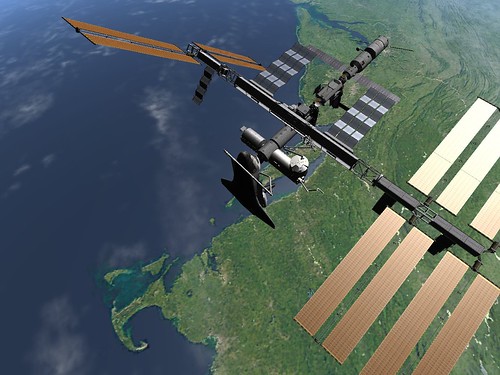
I was looking through some of my Flickr pictures the other day when I noticed a comment from six months ago. I have a lot of screen captures from Orbiter, and one of them was used in an article in an online travel magazine called Matador. It's the one shown here, with the shuttle docked at the ISS with Cape Cod below.
The article is "How to Travel to Outer Space," and it discusses most of the ways civilians have and might be able to get to space, orbital and suborbital - although the Russian Soyuz option to the ISS is probably not going to be available for a while even if you have the $30 million (or whatever the actual fare is). So it's talking about real travel, not virtual stuff like Orbiter. But they liked my picture, which is cool, and they even gave me credit. The Matador site is cool too - most of the trips are down to Earth, but they go to a lot of exotic places.
Update: Speaking of Flickr, NASA has a great Flickr site, NASA: 2Explore. It's not the only place to get NASA images, but it's got a nice selection in multiple sizes and includes current shuttle and ISS missions.
Ah, Paris
Paris is great - I know this will come as a great surprise, but it really is. I'm lucky to have spent quite a bit of time there over the years. Recently I've mostly visited for just a day or so at a time as part of a whirlwind tour of European customer sites (a country a day is pretty much the norm). But it's still great, even if I only stay one night, have a meal or two, and just catch a glimpse of Notre Dame or Sacré Coeur.
You can catch a zoomable, pannable glimpse of most of Paris captured in great detail from a single high vantage point at this web site: Paris 26 Gigapixels. Be sure to maximize it.
Monday, March 22, 2010
Conservation of Books
I read a lot of books, and recently I've been trying to get as many as possible in electronic form, using my iPod Touch, Blackberry Storm2, and occasionally my PC (I have Kindle and Barnes & Noble reader apps on all three devices). Not only does this take up no physical space, but I can have a variety of books with me all the time, allowing me to read a bit while waiting for the dog to do what dogs do (bark at the neighbor's dog) or whatever.
But I still have shelves and boxes of physical books, loved and unloved, read and unread, old and not so old. What to do with them? Many of them I will keep in case I want to read them again (it sometimes happens) or for sentimental reasons. Too many actually. I've donated several boxes to the town library for book sales. I've even thrown away a few (things like ancient programming reference books). But recently I found another solution.
OK, it's actually not a solution, but it's a pleasant problem: a web site called PaperBack Swap. Basically it's a book trading site. First you sign up as a member (it's free). Then you list books you want to give away, and when someone requests one, you mail it to the other member (this costs about $2 to $3 for most books and requires a trip to the post office, though there are ways around this). When the other member receives your book, you get a credit with which you can request a book from the many listed by other members (there are over 4 million books listed). The site has many features that make this all pretty painless (book search, wish lists, labels, reminders, etc.).
But since you get 2 credits just for signing up and listing 10 books, it's not really a way to reduce the number of books I have in the house. But it finds good homes for books I don't need and serves my need for serendipity at very low cost.
But I still have shelves and boxes of physical books, loved and unloved, read and unread, old and not so old. What to do with them? Many of them I will keep in case I want to read them again (it sometimes happens) or for sentimental reasons. Too many actually. I've donated several boxes to the town library for book sales. I've even thrown away a few (things like ancient programming reference books). But recently I found another solution.
OK, it's actually not a solution, but it's a pleasant problem: a web site called PaperBack Swap. Basically it's a book trading site. First you sign up as a member (it's free). Then you list books you want to give away, and when someone requests one, you mail it to the other member (this costs about $2 to $3 for most books and requires a trip to the post office, though there are ways around this). When the other member receives your book, you get a credit with which you can request a book from the many listed by other members (there are over 4 million books listed). The site has many features that make this all pretty painless (book search, wish lists, labels, reminders, etc.).
But since you get 2 credits just for signing up and listing 10 books, it's not really a way to reduce the number of books I have in the house. But it finds good homes for books I don't need and serves my need for serendipity at very low cost.
Wednesday, November 04, 2009
Galactic Suite 2012 - Really?
I guess I'm really slipping when it comes to keeping up with private space. Before seeing this Reuters item the other day, I had never heard of the Galactic Suite Space Resort project. Based in Spain, this company says they are on track to welcome their first orbital guests in 2012, by which time they will have apparently built a a tropical island training center and launch site, a modular space station, and an orbital rocket plane to carry four pax and two crew from the island to the resort. By 2012? It's not even clear that Virgin Galactic will be flying suborbital passengers by 2012, and they've been working on it for a while. Dudes, it's almost 2010!
Maybe they are actually in league with Bigelow Aerospace (which also mentioned 2012 for a space station, back in 2007). Their announced price of $4.5 million for three days at the orbital resort compares very well with ~$30 million for a Soyuz ride to the ISS, but wait a minute. I just watched a video that said they will use Russian flights until their space plane is ready, though Soyuz can only carry one passenger now, maybe two on an upgraded single-pilot version. Doesn't really add up, does it? I'm very skeptical, even though Galactic Suite claims to have an ace in the hole in the form of an anonymous billionaire space enthusiast who has granted $3 billion to finance the project. I wonder if his name is Dr. Evil?
They have a few cool graphics on their web site, but not a whole lot of information. That pretty much seems to sum it up.
Maybe they are actually in league with Bigelow Aerospace (which also mentioned 2012 for a space station, back in 2007). Their announced price of $4.5 million for three days at the orbital resort compares very well with ~$30 million for a Soyuz ride to the ISS, but wait a minute. I just watched a video that said they will use Russian flights until their space plane is ready, though Soyuz can only carry one passenger now, maybe two on an upgraded single-pilot version. Doesn't really add up, does it? I'm very skeptical, even though Galactic Suite claims to have an ace in the hole in the form of an anonymous billionaire space enthusiast who has granted $3 billion to finance the project. I wonder if his name is Dr. Evil?
They have a few cool graphics on their web site, but not a whole lot of information. That pretty much seems to sum it up.
Saturday, October 24, 2009
NASA In My Pocket
I occasionally check iTunes for any new iPhone/iPod Touch apps that might be of interest, especially free ones. Tonight I found a brand-new NASA app for iPhone, called (appropriately enough), "NASA app for iPhone." It's free and works also on iPod Touch (needs WiFi connection).
This app offers a handy way to learn about and track NASA missions with photos, videos, a mission orbit tracker (e.g., a map shows where the ISS is now), and NASA Twitter Feeds and Mission Updates. It's nice how this app integrates access to all sorts of NASA resources, many of which are actually separate web sites run by separate NASA centers.
This is especially convenient for me because for some reason, the security software on my notebook doesn't like the nasa.gov web site and won't let me load it without temporarily turning off the firewall, which I really hate to do (oddly enough it has no problem with jpl.nasa.gov, but most other nasa.gov URL's will not load).
This app offers a handy way to learn about and track NASA missions with photos, videos, a mission orbit tracker (e.g., a map shows where the ISS is now), and NASA Twitter Feeds and Mission Updates. It's nice how this app integrates access to all sorts of NASA resources, many of which are actually separate web sites run by separate NASA centers.
This is especially convenient for me because for some reason, the security software on my notebook doesn't like the nasa.gov web site and won't let me load it without temporarily turning off the firewall, which I really hate to do (oddly enough it has no problem with jpl.nasa.gov, but most other nasa.gov URL's will not load).
Friday, July 31, 2009
And the Pursuit of Happiness!
Can this really be called a blog? If so, then what I am doing is something much less, perhaps just a bl.I just discovered And the Pursuit of Happiness, Maira Kalman's monthly illustrated feature about American democracy which the New York Times calls a blog. It's wonderful. The current one (July) is about Benjamin Franklin. Earlier posts I looked at just now featured Memorial Day and Lincoln.
I'll have to go read the rest of them when I have time, which I don't now. I have to write a short PowerPoint called "The Once and Future Moon" for my presentation at Starfest 2009 tomorrow night. It has to be short because I will have just 30 minutes and I also have to launch a Saturn V, land Apollo 11 on the moon, and take NASA's future Orion and Altair spacecraft for a quick spin around the moon (all courtesy of the Orbiter space flight simulator). Yes, I did wait until the last minute. I better get busy.
Monday, July 20, 2009
We Choose the Moon
I just learned about "We Choose the Moon," a special "live +40 years" web site from AOL and the JFK Museum. It's feeding "real time" audio from Apollo 11, but displaced by 40 years! I happened to "tune in" at about 17 minutes before the Eagle landed (that was at 4:17 pm EDT). So now it's just a few minutes before landing, and it's audio-only, static and all, program alarms, NASA commentary, just like it was for those of us watching TV or listening to radios on this day back in July 1969. Very cool idea! I'll have to tune in for Neil's first steps tonight.
Monday, July 06, 2009
Heartwood: Cool Guitar Site & Blog
I'm working on updating my guitar/voice repertoire of "covers" (songs by people other than me), and this has me searching for good quality chord/lyric sheets (and also tabs, though I prefer chord/lyric sheets for most songs). I was specifically searching for the part that Paul Simon plays on the intro of his classic song "Homeward Bound" when I hit the jackpot with Rob Hampton's site, Heartwood Guitar Instruction. Rob is a guitar instructor in Seattle, and his web site has a lot of helpful guitar resources, but it was his collection of free chord/lyric sheets for some 450 songs (some with tabs) that attracted me. There are at least three special things about this collection:- It's done by a guy who can really play, so the chords are pretty accurate, and sometimes even transposed to more playable key/capo combinations
- He has students of all ages, so he covers Wilco and Death Cab as well as Neil Young and the Beatles
- He provides ad-free Word files in addition to web-formatted (HTML) pages!
Rob also has a blog which is quite cool, and to make sure you have no trouble determining what it's about, it's called A Guitar Teacher's Lesson Notebook. None of this namby-pamby "music of the spheres" business (is it music? is it astronomy? it's both! it's other stuff too!). He's got great playing and equipment tips, funny stories, inspirational ramblings, videos, photos, etc. (and almost as many guitar effects boxes as my producer Roger - almost).
If you play guitar (or are even thinking about playing guitar), check out Rob's site and blog. His stuff almost makes me wish I lived in Seattle so I could sign up for lessons with him - except he's got a five year waiting list, so I guess I'll stay in New England for now.
Thursday, June 04, 2009
Podcast: JPL's Greatest Hits
As I mentioned a few weeks back, I did a second podcast for 365daysofastronomy.org, and it's available today. It's called "JPL's Greatest Hits" and in it, I talk about what I consider to be the "top 10" space exploration missions that have come out of the amazing Jet Propulsion Laboratory since 1958. It's a pretty subjective list, of course, since JPL has done so many great missions and continues to do so today. But it's fun and I hope also informative.I had planned to do a few supplementary posts for this podcast, but I got distracted by other things the last few weeks, and I forgot! I will probably add a few posts on specific JPL missions in the next few days, and I have also started a new set on my Flickr site to post some images.
Of course you can get plenty of information and images from JPL's own web site, including this summary page listing all JPL missions. But what you can't get from JPL is a way to "fly" those missions yourself using the free Orbiter space flight simulator, which is something I mention only briefly in the podcast itself. Add-on makers have created amazing simulations of many of JPL's spacecraft, including 9 of my top 10. Some of these include extensive documentation and will allow you to simulate the missions from launch to orbital insertion or landing. Many include deployable or operable parts, so you can really learn a lot about these missions by playing with these simulations.
I have tried nearly all of these add-ons in Orbiter at one time or another, but not all of them recently, so I can't guarantee that some of the older ones will work right out of the box with the current version of Orbiter. Check with the Orbiter Forum if you have trouble, or post a comment here. I won't use the DJ-like backwards countdown for this list. All of these free Orbiter add-ons and many, many more are available at Orbit Hangar. John Graves is clearly a champion of planetary exploration simulations for Orbiter!
- Mars Rovers, add-on by Scott Conklin ("Usonian") - Amazingly complete and detailed! See picture above.
- Voyager ver. 1.3 by John Graves ("missleman01")
- Viking Mars mission by John Graves
- Mariner 10 by John Graves (my #4 is the whole Mariner series in my top-10, but only Mariner 10 is available for Orbiter)
- Cassini-Huygens Saturn mission by John Graves
- Galileo Jupiter by John Graves
- Mars Global Surveyor is not available, but Brian Jones' MRO add-on is great!
- Surveyor moon landers by Jim Williams
- Magellan Venus by John Graves
- Explorer 1 by Jim Williams (there is a newer version by "Bigmac" that I have not tried)
More to come in the next few days - please check back, and also let me know if you have any questions or special topics you would like me to discuss.
Tuesday, June 02, 2009
Earth, Moon, Mars: Cool Constellation Videos

I got an educational material notification email from NASA today about new interactive activities and videos on the Constellation program. Hosted by astronaut Pam Melroy, the video clips focus on three mission areas for Constellation: Earth orbit, the Moon, and (eventually) Mars. The animations are cool and feature versions of some spacecraft that were new to me, especially the Altair lunar lander and a Mars-bound spacecraft stack with an inflatable "trans-hab" component (NASA licensed that technology to Bigelow, so I guess they figure they'll buy it from him COTS).The focus is also educational, and for the Mars stuff, they note that while the date for a Mars landing is uncertain ("next few decades"), the first astronauts on Mars are probably kids today, kids who should be staying in school and studying math and science so they can their shot at the Red Planet.
Sunday, May 31, 2009
Windows to the Universe: Great Site!
I just discovered an outstanding astronomy and space web site called "Windows to the Universe." It has great reference materials, graphics, audio & video clips, and even games. I tried playing the Space Sense quiz game on the "hard" setting and crashed from 82 km - so close to 100 km! I didn't know that Neptune's winds are the fastest in the solar system, around 2000 km/hour (I picked Jupiter - doh!).Great site!
Thursday, May 28, 2009
Cool Free Music: Benjy Davis & Coldplay
These days there is just so much music available on the web, and there is even a lot that is very cheap, or even legitimately free. Three examples:
Dust by the Benjy Davis Project - I had never heard of this Louisiana band, but last week I was looking through free MP3's at Amazon.com when I noticed a whole free album that had a 4+ star average rating. I sampled a few songs and downloaded it. I've been listening in the car, and it's great! I especially love the song "Sweet Southern Moon" but it's all good. Why is it free? Just promo I guess - usually bands release one or a few free songs, but this is a 13 song album from late 2008. Get it!
LeftRightLeftRightLeft by Coldplay - I love about a third of Coldplay's music, and the rest is just OK for me, but that's just me - obviously they're an amazing band. A free live album? Yup - "here's a thank you to our fans" - nine songs from the current tour. Wonderful stuff, and now I want to see them (so mission accomplished, guys).
Message from Tomorrow - OK, it's only one song and it's mine, but hey, I think it's good, and the MP3 is free for now. If you can't shamelessly self-promote yourself on your blog, where can you do it? There are some other free MP3's there too.
Dust by the Benjy Davis Project - I had never heard of this Louisiana band, but last week I was looking through free MP3's at Amazon.com when I noticed a whole free album that had a 4+ star average rating. I sampled a few songs and downloaded it. I've been listening in the car, and it's great! I especially love the song "Sweet Southern Moon" but it's all good. Why is it free? Just promo I guess - usually bands release one or a few free songs, but this is a 13 song album from late 2008. Get it!
LeftRightLeftRightLeft by Coldplay - I love about a third of Coldplay's music, and the rest is just OK for me, but that's just me - obviously they're an amazing band. A free live album? Yup - "here's a thank you to our fans" - nine songs from the current tour. Wonderful stuff, and now I want to see them (so mission accomplished, guys).Message from Tomorrow - OK, it's only one song and it's mine, but hey, I think it's good, and the MP3 is free for now. If you can't shamelessly self-promote yourself on your blog, where can you do it? There are some other free MP3's there too.
Wednesday, May 13, 2009
Hubble Top 100
Hubble images are all over the web, but here's an especially nice page I found at the ESA Hubble site. Click on one of the top-100 thumbnails, and you get a descriptive page for that image, with links to download it in many sizes. Cool. There's also an ESA SM4 blog following the mission in great detail.
Tuesday, April 28, 2009
PTTU: Be Careful!
I need to be extra careful around my computer now that I have a Portal to the Universe on my toolbar, though I don't think there's much chance I'll fall through it and end up in the Crab Nebula. It is a really cool new way to keep up with all sorts of astronomy and space-related developments. I guess it's a Web 2.0 kind of "aggregator" that collects and displays news items, blog posts, podcasts, and such in one convenient place. I even found my most recent blog post on the pull down list on my toolbar. Cool!
Subscribe to:
Posts (Atom)