Showing posts with label iPhone. Show all posts

Thursday, December 25, 2014

Yes, But Is It Art?


I've been thinking about all the fooling around I've been doing with the Brushstroke app, Band-in-a-Box, Siri for dictating my journal, and various other technologies that augment my mental and creative powers. What's that all about? It's definitely fun, but is it art?
I should say at the outset that this is not an emotional question for me, but more of an intellectual exercise. I definitely do not lie awake at night worrying about whether my songs, blog posts, photographs, fake paintings made from photographs, or whatever constitute “art” or not. Whether anyone in the world would consider me an “artist,” even myself, is not a concern to me, though the fact that I post some of my work online suggests that I do seek some sort of audience. But mainly I enjoy using my mind to create things. In some philosophies, that is probably the essence of art. In other philosophies, perhaps this is merely navel-gazing until it reaches a certain level of quality, acceptance, or audience. I really don't know or especially care. 

But apart from semantics, what is going on when you create something with “intelligent” tools such as the Brushstroke app for painting and Band-in-a-Box (BIAB) for songwriting and recording? Apart from things like singing, dancing, and spoken poetry, every art involves some level of technology. Brushes, paint, musical instruments, paper, pens, tape recorders, and many other tools allow us to create works of art that extend beyond our own bodies and voices.

But with software and “machine intelligence,” the tools seem to be taking over more of the creative part of creativity. They are certainly reducing the level of mechanical skill required to achieve something that is “pleasing,” if not necessarily professional or artistic or original. I have never been a painter, but when I closely examine the simulated brushwork in some of the paintings created by the Brushstroke app, I'm amazed by its intricacy and by the variety of techniques that are implied. It clearly would take a lot of study, practice, experimentation, and work to achieve such things with real paint. The professional musicians who create RealTracks for BIAB play at a level that is far beyond my skill on any instrument. The software cleverly allows me to apply their skilled performances to new songs they have never heard. And the results are often surprisingly good, at least to me.

When writing was developed thousands of years ago, there were people who worried that this “cheat” would cause people to become lazy, and their minds to decline, because they would no longer need to memorize culture-defining epic poems and such. Spoken word is still an important art form (drama, radio, etc.). But writing is of course an art in itself, and we know how important it has been for the development of civilization. And while I will readily admit to laziness and declining memory, I still manage to get a few things done.

Tools are just tools, no matter how fancy they may be, or how much of the creativity they may seem to contain. Creating songs or visual works such as photographs, drawings, videos, or even paintings, is partly about skill and technique, but even more about choices and feelings. Different tools require you to make different choices, and sometimes really different kinds of choices. Even if you do not make the brushstrokes or play the horn parts yourself, you need to choose the the subject and the overall design of the work, as well as which of many possible techniques or performances to use.

Smart tools allow people with an interest in creativity to create something that is artful even if it is not necessarily art. And as happened with photography, movies, television, and sound recording, these new technologies will probably lead to new art forms that we can't even imagine now. I'm thinking that humans or transhumans will continue to create something like art, and that there will be virtuosos and average people and dabblers and everything else, forever and ever, amen.

These and many other Brushstroke experiments are in a Flickr album, most with both the before and after photos:
Brushstroke App Examples

This is a video slide show of Brushstroke photos from our Australia vacation in 2006, with music:
Australia Memories 2006

Thursday, December 26, 2013

Scribd: Getting Even Cloudier

I've noticed that more and more of my "media experiences" are streaming from the internet. With the help of Apple TV or the wifi connection in our Blu-Ray player, we rent movies from iTunes or Amazon Instant Video. Although I have local mp3 copies of most of my music, I do most of my music listening from two cloud sources, Amazon Cloud or Apple's iCloud. Sometimes for variety or laziness I will stream music from Pandora or iTunes Radio. I even stream pictures of my granddaughter from my daughter's iPhone (Apple's shared photostream).

Now I've started "streaming books." For several years, I've been doing most of my reading with Kindle e-books, buying several a month from Amazon. This is convenient but somewhat wasteful, since I read most books only once, and Kindle books cannot be shared or sold. Books are very small files compared to video or music, and they usually download in seconds. This also means that books could easily be "streamed," i.e., read directly over the web, once someone comes up with a business model to support this.

Now someone has, a company called Scribd ("the world's digital library") that's been around for years as a document sharing site, mainly for free documents (I have long had my Orbiter tutorial book Go Play In Space on Scribd for free PDF download). I haven't really looked at Scribd for a long time, but it's clear that they have been busy, and they have expanded into "non-free" books. Their latest thing is a subscription service which gives you online reading access to many commercial e-books for a flat rate of $8.99 a month. It's currently limited to only a few publishers, and mainly "back catalog" books, with relatively few current best sellers, similar in that respect to Netflix for movies.They currently offer over 100,000 titles, and they are working to add publishers, so I'm sure this number will increase over time.

They have a 30 day free trial, so I'm trying it. I'm pretty sure I will continue, because I have already found at least 10 books that I have previously considered buying on Kindle, as well as a dozen more that are new finds. My idea is that rather than buying 2-4 books a month on Kindle (for maybe $20+ a month), I'll probably read a couple of Scribd books and buy maybe 1-2 Kindle books if they aren't available on Scribd. It doesn't bother me that I won't "own" those books (I'm guessing I don't technically own my Kindle books either, only a license to download and read them whenever I want). I'm OK with the "paid borrowing" model, and Scribd allows you to download up to 10 books onto mobile devices for offline reading. The Scribd app for iOS works really well on iPhone and iPad, similar in most respects to the Kindle app. Since $8.99 is less than the typical cost for a single Kindle book, Scribd will be a good deal even if it only keeps me from buying one Kindle book a month. This makes me wonder how long it will be before Amazon or Google buys Scribd (maybe they will wait a couple of months and see how the subscription service does).

So I like this. Now if I could only eliminate my real book bottleneck - the fact that I can still only read one book at a time, and that there are still only 24 hours in a day. Severely limited mental bandwidth! As soon as they invent a multi-threaded brain, I'm ready to upgrade.

Thursday, September 19, 2013

iOS 7 & Kindle App Collections (Finally)

This week, Apple released the latest version of its iOS operating system for iPhone, iPad, and the latest generation iPod Touch (not mine). I read about various warnings and it seemed likely to work pretty well on an iPhone 5, so I backed up my stuff and installed it there. I decided to wait for a point release or two before installing on my iPad Mini, since I read warnings of possible bugs that could affect music-making apps. Since everything there seems to be working fine on iOS 6, I will wait for some other iPad music makers to give the all clear. Installation on the iPhone was easy and so far it's working well for me.


There are probably a zillion detailed reviews so I won't try to cover everything. My general impressions are similar to others I've seen. Although the use of high-contrast primary colors for many of the icons gives a crazy-quilt look to the home screen, I mostly like the clean, sparse, Crate & Barrel look. Much of it comes from using a wiry-thin font and having no borders around... pretty much anything. I'm mostly used to it already, although with app screens having minimal content and few controls like the timer, it's a bit TOO sparse.

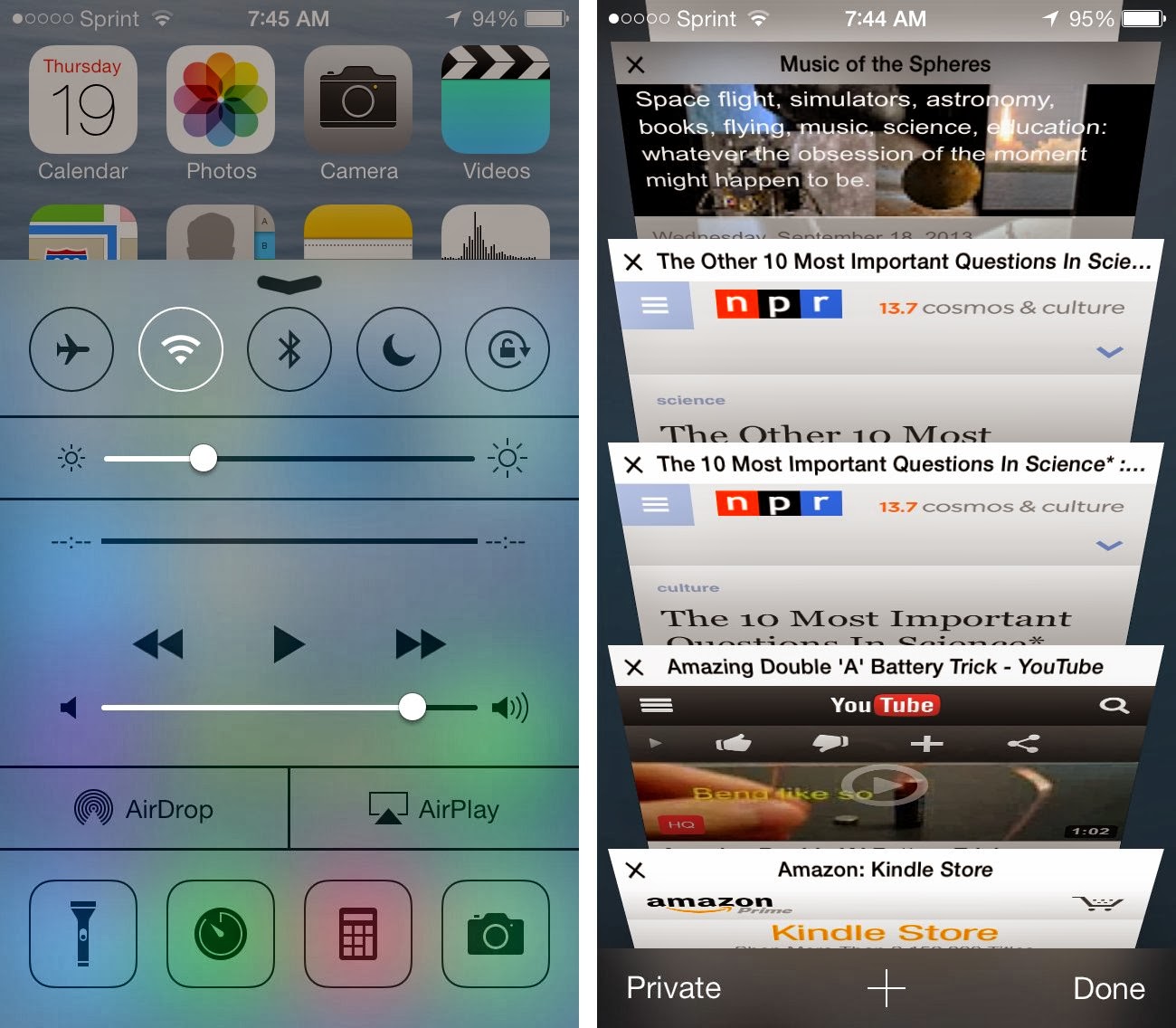
One of the coolest new things is the translucent control panel that you can access from any screen by flicking up from the bottom edge. It has most of the things you need to access frequently, like music controls, airplane mode, brightness, even a flashlight (the camera flash LED). I also like the changes in the Safari web browser, including a top-down "carousel" view of your open web pages. There are similar re-designs of the interface and display features for the photo album, camera, and other Apple-supplied apps. The new iTunes radio is pretty cool too, with artist- or style-based "stations" similar to Pandora, but based on the contents of the iTunes store (with a convenient button to easily buy any song that pops up and strikes your fancy). I quickly set up a station based on my own iTunes songs to see which "real artists" my music might suggest - a mixed bag in my first test - Neil Diamond (at least it was "Sweet Caroline") and Barbra Streisand?? But also Five for Fighting, Jason Mraz, Eric Clapton, and Billy Joel. So I guess their algorithm is OK with me (whatever they may use when the reference artist has very small sales numbers!).

One of my favorite iOS 7 things is not from Apple - it's a new release of one of my most frequently used apps, the Amazon Kindle reader. It is redesigned to comply with iOS 7 interface style guidelines, but more exciting for me is COLLECTIONS. Finally! I have a lot of Kindle books, and up to now, the iOS app has had no folder system or similar method for organizing them into categories (some physical Kindle devices have included collections for a long time). Collections are similar to folders, but you can assign any book to one or more collections (or to none). It works pretty well, and it is used for items on the device as well as in the Cloud (downloaded items appear in the folder with a small check mark). This is great, because it allows you to see everything you have placed in that category, whether or not it is local (and if you have a web connection, any Cloud book can be downloaded in a few seconds).