Showing posts with label games. Show all posts

Saturday, April 16, 2022

Earth Simulator (with Airplanes)

I've resuscitated this blog to write occasionally on my continuing infatuation with Microsoft Flight Simulator 2020. If you've read any of my earlier posts, you will know that I am a lifelong "airplane nut" and that MSFS does a very good job of simulating the experience of flying an airplane, as well as any simulator I have tried that doesn't move. It's actually better in most ways than the few I've tried that did toss me around in a small capsule with a screen in front (I have not yet tried a full motion simulator with VR, which could be great or sickening or possibly both). 

Even after hundreds of hours in the simulator, I am still finding new and wondrous things in the experience, and especially in the beautiful visual world as modeled within the simulator. As I have noted elsewhere, it is the combination of cloud computing, fast internet connections, fast computers, and advanced graphics processing that makes it all possible. Modeling the entire planet requires petabytes of data that can be selected and streamed "on demand" to your PC or XBox. There it is combined with flight modeling, weather modeling, sound modeling, and more to create the 25-60 high-res images per second needed to fool you into believing that you are in control of an airplane moving at extreme speed. One for each eye if you are in VR. 

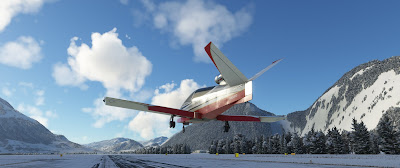
I sometimes like to fly amphibious planes so I can land in water or on a runway. If I'm using Live Weather or if I decide to crank up some wind at ground level, water operations can be challenging. 


I devoted an earlier post to my amazement at the way light and weather are modeled in the sim, but sometimes I find new surprises. as when I was flying a silver PT-17 Stearman biplane near the Phare de Gatteville on the north coast of France, just after sunset. As I circled low around the lighthouse, the rotating beacon illuminated my wing, and the reflection was blinding! 


Even as I have started to take some real-life refresher lessons in a Cessna 172, I continue to be fascinated by what is really more of a dynamic "Earth simulator" than a "mere" flight simulator. 


Monday, March 28, 2022

Mind the Power Lines!

Microsoft Flight Simulator (MSFS) continues to provide a range of enjoyable distractions as I explore various corners of the world, usually in VR and often with online friends who share the virtual skies with me while sitting in Australia or Finland or wherever they may be. Recently I did some flying in Wales with my friend "MiGMan." We tried out a new "low and slow" airplane on his flight plan from Cardiff (EGFF) and then went back to our usual Italian jet trainers, this time with a new custom paint job. He has posted excerpt videos from our flights here, here, and here. 

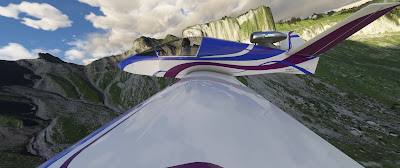
The Edgley Optica is a slow, rather bug-like airplane with great visibility through its bubble canopy. Quite nice to fly in VR. In lieu of a copilot, it offers animated pets, a dog and a cat. Fortunately these can be turned off with a switch. The image above is a screenshot from one eye of my VR headset. The per-eye field of view is pretty small, but since the left and right eye images are offset and overlapped to produce a 3D stereo view, and since the view continuously updates as I turn my head, the headset gives a convincing illusion of a 360-degree world around me with no sensation of "tunnel vision."

Although VR is great while flying, it doesn't produce the best screen shots and videos, so I often use my wide screen when I want to take pictures. I'm experimenting with offset "GoPro camera" views like the one above, flying low over the Welsh countryside while avoiding terrain, radio towers, and power lines like those shown here. 

Here's another "GoPro" shot from the tail of the aircraft while in a loop over Cardiff. 

Formation flying in multiplayer is an interesting 3D motion problem. While 250 knots is slow for a military jet, you can get separated pretty fast at 4+ miles per minute. So you really need to pay attention to your throttle, trim, and position, making frequent small corrections to stay in sync with the other aircraft. This is a VR frame that was cropped. Fortunately the resolution is high enough to allow this, roughly 3100 pixels square for the HP Reverb G2 headset I use. 

Microsoft Flight Simulator lets you use location-based "Live Weather," or you can choose any weather and time of day you like (you can also choose the date which gives you the proper sun position for seasonal lighting changes). For multiplayer flights, we usually choose decent weather with few clouds and mild winds. But if you're up for an IFR challenge, you can fly in a thunderstorm if you like. We took a look here and went back to mostly blue skies. 

Microsoft continues to update MSFS with new content every couple of months. Just last week they released a big "Iberia" update with new and enhanced scenery for Spain and Portugal. Looks good, but I've been more focused on the UK because of a "special project" coming up in June. I'll write more about this in the coming weeks. 


Wednesday, January 26, 2022

Exploring Switzerland with MiGMan

I've been virtually exploring many cool areas in Africa and Europe with the help of a new series of VFR flight plans for Microsoft Flight Simulator, MiGMan's World Tour. They include a large number of locations with richly illustrated guides to help you decide where to fly next. The flights are fairly short (depending on the aircraft you choose) with an emphasis on the scenic and the unusual in the huge, detailed world of MSFS.


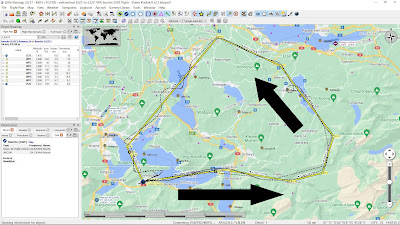
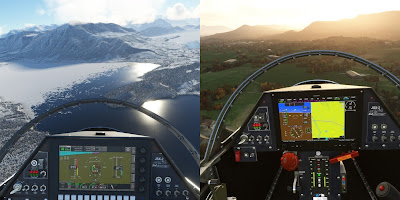
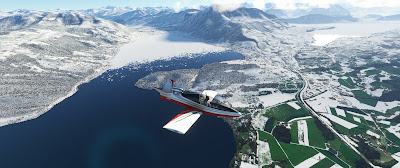
I made a new video (music by me) from a series of screen captures done on two flights around Lake Lucerne, Switzerland, both based on the same flight plan from MIGMAN'S FLIGHT SIM MUSEUM - EUROPE VISUAL VOL. 4. I first flew the plan in the "wrong" order, crossing icy Lake Lucerne to the east at fairly high altitude, and with Live Weather - lots of snow and frozen lakes in January. Then I flew it again in the published way point order, this time at low level, with "cloudy horizon" weather and with the date set to late fall. So different! Here's another version, full video flown and narrated by MiGMan. 

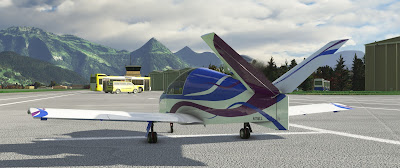
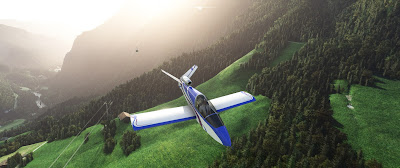
I was using Bijan's Four Seasons addon to add variety to the vegetation, as well as addons for powerlines and lifts (ski lifts and cable cars are everywhere in Switzerland). You can see those (and avoid them) when flying down low. I was in VR which makes it easy to judge your position when flying low in valleys and around obstacles. I chose a new aircraft I just bought, YSIM's SubSonex JSX-2 “personal jet” which is really fun in VR. A cozy little jet. I might build one! 

MiGMan’s World Tour series has many great flight routes throughout Europe and Africa, so there’s no special need to fly the same one twice. But as you can see from these screenshots and especially in the video, changing the weather, the altitude, and the direction brings out different aspects of the beauty of Switzerland’s mountains, valleys, lakes, and towns. I also enjoy getting familiar with the terrain as I explore an area from different perspectives. So the “replay value” of these flight plans is excellent.

Of course Switzerland is amazing and these flights show that well. But there are hundreds of less famous but still beautiful places all around Europe and Africa, and this series has surprised me many times with unexpected wonders. If you love geography as I do, Microsoft Flight Simulator is the biggest and best playground ever, especially if you also like airplanes (as I apparently do). 

Microsoft points out that you can fly anywhere in the world, but as with real-world travel, it’s helpful to have an experienced guide who can lead you to incredible places you might never think to visit otherwise.


Tuesday, November 09, 2021

Light and Weather in Microsoft Flight Simulator

Fans of flight simulators often talk about how “immersive” a sim is. It’s about how much the sim experience makes you feel like you’re flying a real airplane. Visuals are obviously a key component, and VR can take this to a higher level in terms of feeling truly surrounded by a 3D environment made up of the structures of your aircraft as well as all the natural and human-built objects in the simulated world around you. Sound is also very important, as are physical controls like yokes and rudder pedals (controlling an airplane with a keyboard is definitely an immersion killer). Realistic ATC (Air Traffic Control) communications are important especially for airliners and military flight sims.

Microsoft Flight Simulator 2020 addresses all these components, but to me, lighting and weather are the pieces that really pull it all together. Things we take for granted in real life like shadows, reflections, transparency, refraction, and color shifts are all well-simulated in MSFS. Making things look real also requires careful attention to materials and to how light interacts with them, including their colors and how shiny or rough they appear to be, which also affects color.

MSFS uses techniques called PBR (physically based rendering) to pull this off. Notice how the yellow features in this Stearman paint scheme (above) are reflected and distorted in the shiny blue fabric panels of the wings. The colors are shifted by these reflections as well as by shadows and by the angle from the sun at which you are viewing the surface. PBR techniques are also used to make buildings, runways, and other surface objects appear more realistic, often in combination with photogrammetry. 

Photogrammetry uses photographic imagery for measurement purposes, and in MSFS, this real-world data allows many cities to appear nearly photorealistic. Based on the resolution of the captured data, objects as small as signs on buildings may be readable, depending on your position and altitude. Technologies such as radar and lidar can also be used to accurately measure the height of terrain, and such data is often available to simulation modelers. Although MSFS recreates the entire surface of the Earth, the level of available detail varies by location, with many major cities covered by detailed photogrammetry (like New York City, shown in a VR stereo pair below), while many others depend on AI-based “autogeneration” of 3D objects including buildings, mountains, trees, etc. 


The appearance of objects in a simulation naturally depends on light sources, and MSFS incorporates multiple light sources starting with the sun and the moon (both accurately positioned based on the location, date, and time of day). I believe starlight is also modeled. Human-made light sources include streetlights, vehicle lights, light from building interiors, airport lighting, etc., and what amazes me is  when light sources interact with surface properties (reflecting or scattering) as well as with atmospheric properties like clouds, mist, rain, and snow. The resulting scenes can be uncannily realistic.

Speaking of rain and snow, weather is the other big piece of “immersiveness” I wanted to briefly discuss here. It’s a critical subject in real life aviation and in the sim. Microsoft and Asobo and their partners have placed huge emphasis on making weather look and feel right, and the system they developed is incredibly detailed, flexible, and easy to control.

Not only can you adjust any location's time and weather to your choosing - from clear skies to heavy clouds, to snow and storms – with “Live Weather,” you can even set it to match real conditions taking place in that part of the world. But if you don’t like the time of day, the wind, the height of the clouds, the height of the waves, or the depth of the snow cover, you can change any of that without even stopping your flight, using the interface shown above. 


Rather than drone on and on about this, allow me to recommend two brief developer videos that clearly explain how they managed to make the weather so real, it can get scary at times. Fortunately I can switch to clear skies anytime and (usually) not hit the mountain that was behind that cloud!

Feature Discovery Series, Episode 2: Weather 

Partnership Series: Meteoblue - Weather Forecast System

Saturday, November 26, 2016

Orbiter: 2016 vs. 2010


As I wrote recently in this blog and in an article in The Space Review, Orbiter 2016 was released in September. This is the first major release of this freeware space flight simulator since Orbiter 2010, and as I mentioned, not all of the many third-party addons for the 2010 version are working in Orbiter 2016. If you are familiar with Orbiter, you know that it's quite easy to have multiple installations of the software on the same PC, so there is no need to replace the 2010 version with the 2016 version -- as long as you have the disk space, you can keep multiple copies of both versions installed in separate folders and just run the one that has the features and addons of interest at the moment. In the picture pairs below, the top screenshot is from Orbiter 2010, the bottom one is from Orbiter 2016. 

You should also know that although there are some user interface changes in the 2016 version, they are really quite minor, so even if you are new to Orbiter, you can install and use both the 2010 and 2016 versions quite easily. Some developers have already updated their addons for 2016, and others no doubt will when they have the time and inclination. But Orbiter 2010 is still readily available, so if you are interested in the Apollo program, the advanced Shuttle Fleet, the fictional spacecraft of 2001: A Space Odyssey (sample screenshot at the top of this post) or Colliers Magazine, and many other addons, there's no need to wait for 2016 versions to come along. Note that the final version of Orbiter 2010 is often called 2010-P1 (patch-1) or 100830 (August 30, 2010).


Here are some observations and tips for working with both Orbiter 2010 and the new Orbiter 2016:

1. The biggest user interface difference is that the "no-cockpit" full screen pilot view has a control bar that appears when you hover the mouse near top edge in the 2016 version. In the 2010 version, the F4 key will pop up a small menu bar with same controls (in the 2016 version, F4 will toggle the top edge menu between "on" and "auto-hide"). See "no-cockpit" comparison screenshots above. 


2. The biggest visible difference in the 2016 is in its support for highly detailed surface terrain data complete with elevations, so mountains and craters are true 3D objects. This makes for some incredible eye-candy especially when you are flying low over the terrain, but in most situations in Orbiter, you are orbiting (oddly enough) 200 km or more from the surface, and the flat 2010 terrain textures look just fine. 

3. In addition to the general high-res 3D surface data for all of Earth, the Moon, Mars, and some other bodies, Kennedy Space Center (cockpit view above) and the Edwards AFB/Mojave region (see shuttle final approach screenshot below) have been given super-detailed makeovers in Orbiter 2016. Again, this doesn't matter much if you are in orbit or cruising to the Moon or Mars, but it does add a lot to the realism before you launch or when you are landing at Edwards AFB. 


4. There is a thread on the Orbiter Forum that reports addons that are known to work in Orbiter 2016. There are quite a few and there are probably many others that have not been tested but may work. Orbiter Sound 4.0 works with Orbiter 2016 though there are a few minor glitches such as incorrect audio feedback for some actions (e.g., the G key for "landing gear" in the Deltaglider will deploy the gear but audio will say "radiator deployed"). 

5. Some popular addons that currently seem to work only in Orbiter 2010 include AMSO (Apollo program in great detail), Shuttle Fleet V4.8 (which is freaking amazing), and the excellent "World of 2001" and "World of Colliers" addons by "Sputnik." Note that even for 2010, some addons may only work with Orbiter's "native" graphics (not the D3D9 Orbiter_NG client which offers better graphics quality and frame rate). I'm not sure how to know this for sure, but if you find that your spacecraft are invisible in the D3D9 client, you should try the native graphics version. 


6. One addon I especially like is the videnie module for orbital path drawing by "artlav." It renders orbital paths for spacecraft, planets, and other bodies in exterior views (green, red, and purple lines around Earth in screenshot above from Orbiter 2010). This is super cool and very helpful in understanding orbital paths, but it only works in native graphics mode (not orbiter_ng) with Orbiter 2010.

7. If you have plenty of hard drive space available, a good general tip is to create two separate "clean" installation folders, one for Orbiter 2010-P1 and one for Orbiter 2016, including whatever terrain data you prefer, and perhaps with Orbiter Sound 4.0 installed. Make a copy of the clean installations and install any desired addons there. Note that Orbiter 2016 installations with full terrain data can be very large (I have one installation that is 58 GB). 

8. Orbiter Sound supports mp3 playback with control over when the music plays (e.g., exterior views only). But since modern versions of Windows support multi-source sound multiplexing, I tend to just stream music from Amazon or iTunes while running Orbiter. An album of Strauss waltzes is a particular favorite, especially with the World of 2001 addon.


Note: The screen shots here are from Orbiter 2010 and Orbiter 2016, without modification. You can find them and various others in full screen resolution in this Flickr album. 

Saturday, October 29, 2016

Orbiter 2016 Is Here


Orbiter 2016 is the latest version of a space flight simulator I have been playing with on and off since 2005. And while I'm now old enough to be a grandfather, I find that Orbiter still brings out the "space kid" in me. The sixties were a great time to be a space- and aviation-obsessed kid, and I was a NASA fan from Mercury to Gemini to the Apollo moon flights and beyond. Aside from TV coverage, my only space resources back then were books from the library, plastic model kits, LIFE Magazine, and a huge trove of "NASA Facts" and other free publications I would write to Washington to request. Fortunately NASA had a pretty big public relations budget in the sixties and they were happy to send bulging envelopes of space info to a kid in upstate New York.


I never really lost my fascination with space and aviation, as I have often discussed in this blog (though not so much recently). Thanks to personal computers and the internet, there are now more space and aviation resources than ever. I spent a lot of time in the nineties playing with various flight simulators, and I got my real pilot's license in 2001, though I ended up not flying nearly as much as I had hoped, and I am not an active pilot now. Orbiter was a great find in 2005, because it allowed me to combine my interest and experience with flight simulators with my long dormant goal of being an astronaut, albeit only a virtual one. And Orbiter was free (it still is).

Orbiter even inspired me to write a book called Go Play In Space (free Orbiter tutorial ebook), and to volunteer as a NASA/JPL Solar System Ambassador to do some space and astronomy-related educational outreach programs, often using Orbiter in my presentations as a dynamic extension of PowerPoint slides and words. The years 2005 to 2010 were probably my "golden age" for space related study, play, conferences, and educational outreach, but shortly after the release of Orbiter 2010, my company was acquired, and my professional workload greatly increased. Side interests like Orbiter largely fell by the wayside.


Things are still busy at work, but I do again find time to pursue hobbies like music and space, and with the recent release of Orbiter 2016, I'm getting fired up again. The biggest visible change in the 2016 version is built-in support for detailed 3D terrain on planetary surfaces, with gigabytes of data available for the Earth, Moon, Mars, and some smaller bodies. This doesn't matter much visually from a 300 km orbit, but when you are down low, it makes a huge difference, especially for the Moon and Mars. Earth terrain is nice too -- though not as detailed as in Microsoft Flight Simulator, it covers the entire globe (clouds are modeled too). Orbiter is primarily a space flight simulator, and although atmospheric flight is modeled reasonably well, if you are mainly interested in flying airplanes and understanding realistic flight operations, a dedicated flight sim like MSFS or X-Plane is probably a better bet.

Orbiter 2016 includes some other updates, and thanks to user interface improvements and a wide range of community-produced video and other tutorial materials, it is easier to learn and use than earlier versions, though the learning curve is still pretty steep.


I will be writing more about Orbiter 2016 in the coming weeks. In the meantime, here are some possibly helpful links, including a collection of Orbiter 2016 screen shots I have placed on my Flickr site.

My review of Orbiter 2016, Kerbal Space Program, and Space Simulator (iOS app) on The Space Review

Orbiter 2016 Screen Shots on Flickr

Main Orbiter website with free download links

Orbit Hangar: Most Orbiter add-ons are hosted here for free download

Home page for the Orbiter Forum

Download my free ebook Go Play In Space here (PDF, 2006 version, Wiki version here)

David Courtney has a large number of Orbiter tutorial videos here

TexFilms has many Orbiter videos including tutorials here


Sunday, August 11, 2013

Kerbal Space Program?!?


I read something about KSP (Kerbal Space Program) a couple of years ago but I didn't do anything about it. Then the other day I saw this comic on xkcd, referencing KSP. If you hover your mouse over the comic, the comment says "Ahem. We are STRICTLY an Orbiter shop." Me too! But I was curious about what had happened to KSP since it was last (vaguely) on my radar.

Quite a bit, it turns out. It's still in an extended alpha development phase, but it's already got some interesting capabilities for people who like to "play in space" (something I once wrote a book about). After looking at a few web sites and videos, I decided to download and try KSP for myself (current version is 0.21.1, and it costs $23, including future updates). So what is KSP? From the web site:
KSP is a game where the players create and manage their own space program. Build spacecraft, fly them, and try to help the Kerbals to fulfill their ultimate mission of conquering space.
Essentially it's a space flight simulator with reasonably accurate physics, wrapped in a game-like interface with pretty decent graphics and some quirky alien-like astronaut characters (KSP's developers also seem to have a quirky sense of humor). It is just now starting to emerge from its "sandbox" phase (with the ability to build and fly your own spacecraft, but without any specific game-like goals). At this point, it's something like 3D simulated model rocketry, but with the ability to launch the rockets you design into space (orbital mechanics is involved, but the math is hidden behind clever controls and displays). You can dock with space stations, travel to and land on other planets, and try to navigate your spacecraft back to Kerbin for a safe landing.


Yes, Kerbin, not Earth. This fictional solar system has real physics (orbital mechanics and atmospheric flight) but it doesn't use the names and specific physical properties of our own solar system. Kerbin is an Earth-like "exoplanet" with two moons (Mun and Minmus - you can fly to and land on them).

So far I've only scratched the surface of KSP, and I don't know how much time I will spend with it. It depends in part on whether I start to do some space-related educational outreach again. I haven't done any for quite a while. When I have done school presentations, I have generally used Orbiter to dynamically demonstrate certain aspects of space flight and the solar system. That's cool for demos, and it beats simply using PowerPoint, but Orbiter's learning curve is quite steep, and it's hard for me to recommend to any students younger than maybe 11 or 12. KSP is definitely more kid-friendly. The rocket building section (see picture at top of this post) is simple yet powerful (though there is no guarantee that what you build will fly well or at all - the physics is pretty realistic, so you have to worry about mass, thrust, stability, etc.). As the Minecraft craze shows, kids (and adults) love to build stuff inside virtual worlds (and real ones). While building your own spacecraft for Orbiter is certainly possible, it's a separate "add on" development process, not integrated with the simulation itself.


KSP also integrates the instruments and controls needed to change orbits directly within the 3D views (spacecraft and map), making it easier and less abstract to see the effects of firing your rockets at certain times, locations, and directions. The screenshot above is from the integrated Orbiting 101 tutorial, and it shows the "maneuver node system" being used to predict the effect of a pro-grade burn at the low point of the orbit (periapsis). Dragging the pro-grade symbol changes the delta-V (speed change) value, and the dotted orbital path shows the predicted effect in real time (your path doesn't actually change unless you make that proposed burn at the proper time and with the correct ship orientation). Orbiter has similar capabilities (and much more) with its various "MFD" instruments, but these work like display screens in the cockpit, not directly in the 3D view. More realistic but also harder to visualize and understand.


KSP allows you to build and fly some pretty cool and complex space vehicles such as multi-stage rockets with strap-on boosters, and even Apollo LM-like landers such as the one shown above (docked with an Apollo-like command module housing three Kerbals who are about to land on the Mun - this is a supplied sample scenario). Although it's easy to build monster rockets with many engines, you do need to pay attention to structural integrity, symmetry, and stability or your giant booster may tumble out of control, crash, and burn. Unlike in Orbiter, things can and do blow up in KSP, though at the moment the hardy Kerbal astronauts are immune to G-forces, allowing you to perform high-G atmospheric entries and the like with impunity (this will undoubtedly change in future versions).

Future versions will also include a flight sim-like "career mode" with awards for completing certain missions or milestones like docking or landing on the Mun). I suppose that training options will also expand, although there is already some basic training in the game, and a variety of user-created tutorial videos and PDF's available on the web. Note that since changes between versions can be pretty extreme, there is no guarantee of backwards compatibility for previously built things when you upgrade.

I think KSP is already a great educational tool, because it is sufficiently "toy like" to be fun and non-threatening (think building robots with Lego MindStorms, but much cheaper), but powerful enough to allow really interesting and challenging activities. I really like the emphasis on what is essentially engineering - designing, building, testing, and thinking about why things work or don't work so the next iteration can be better. And remember, to engineer is human (and sometimes fun too).

Monday, April 08, 2013

F-Sim Space Shuttle - Video!


F-Sim Space Shuttle (iTunes, also available for Android devices) is the only gaming app that stays on my iPad and iPhone for very long. I don't play it all the time, but every once in a while it's nice to shoot a few space shuttle approaches just for the fun of it. The latest update (v2.8) just came out, and developer Sascha Ledinsky has added a really cool feature: the ability to export videos of your flights!

He added external views and in-app replay features long ago, but with video export, you can share your accomplishments with the world - in HD! So of course I had to try it. This YouTube video features a "safe" landing (not bad except for landing left of the runway center line), with a musical soundtrack added in iMovie (2 minutes of the song "Down & Out" from my recent album "Look at You," available on iTunes, not to mention Amazon.com).

UPDATE: A small tip has helped my landings immensely - pinch-zooming to enlarge the HUD display so the FPM (flight path marker) and "guidance diamond" are easier to view and position. I finally made a "perfect" final approach landing for 900,832 points, recorded in this video. Next stop: a perfect full-HAC approach and landing, and a million point landing. Then I will retire just like the real shuttle pilots. Unless I decide to pursue shuttle aerobatics, like this amazing barrel roll on short final, followed by a good landing (flown by Sascha, the developer of F-Sim Space Shuttle). Slick!

Monday, February 13, 2012

Wow! Scale of the Universe 2 (Interactive Flash)

Yes, there are a lot of things that are "the coolest thing ever," but this is definitely in the running for that illustrious and ever-changing title. "The Scale of the Universe 2" is an interactive Flash activity with a slider that goes from a scale of 10**(-35) meters (ten to the minus thirty-fifth power, very small) to 10**27 meters (bigger than the known universe).

This "interactivity" was created by Cary Huang. It's similar to the famous "powers of ten" movie except you can control it in both scale and speed (about 13 seconds to go from smallest to largest at maximum scroll rate) and you can click on objects to learn more about them. It comes complete with spacy background music. Awesome! Thanks to Matt Bors for posting this on Facebook.

Thursday, July 21, 2011

End of the First Space Plane Era

With the final landing of Atlantis (STS-135) early this morning, our first space plane era has ended after 30 years. I'm sure that human spaceflight will continue, and we will have other, better space planes someday. But Atlantis and her sister shuttles were a pretty audacious start, designed and built as they were with the technology of the 60's and early 70's. I'm happy that I got to witness the one launch that I did (Endeavour's STS-118 back in 2007).  I would have loved to have flown in one.

I couldn't do that, but I was happy to discover last night that version 2.0 of the great iPhone app F-SIM Space Shuttle was recently released. The new version of this shuttle landing simulator adds wonderful external views and a cool replay feature that allows you to enjoy your successful landings and scrutinize your errors in great detail. The shuttle era lives on in a small way on my iPod Touch and on iPhones and iPads everywhere.

Here's a great personal video of the real STS-135 landing from someone who had a great viewing spot, and here's the official NASA video which includes a few seconds of the cockpit HUD view at the very start (F-SIM Space Shuttle duplicates the HUD view and behavior quite exactly). 

Wednesday, December 08, 2010

F-SIM Shuttle Obsession

I've now got about 6 hours of "flight time" in F-SIM Space Shuttle on the iPod Touch - which is a lot of flights at about 2 minutes each (about 165 flights). I'm still mainly doing final approaches, trying to become consistent enough to get mostly "safe" (and eventually "good" and "perfect") landings and fewer "hard" landings (but still a fair amount of "crash" landings when I lose focus). So far my top score is 193,000 - nowhere near the one million that's apparently possible on a really perfect landing. I wish I had a faster learning curve, but it's still fun. OK, an obsession, but fun. It really requires close concentration and a delicate, balanced touch when tilting the very low-mass iPod Touch to control your flight.It also helps to read the instructions and to watch the Autoland demo multiple times. Every time I do I notice some other little point that helps me improve. I'm still a little weak on the final flare - timing and amount, and also drifting right or left on that pull. It's very touchy.

One thing I did was to look up some HUD video of real shuttle landings on YouTube (here's a good example, and this one starts at about 80K feet at about Mach 2, before the entry to the HAC, and has a lot of pilot conversation). This really confirms the excellent realism of the HUD and the overall "sight picture" and speed sensation in the sim.

The picture above is a real HUD shot from an approach to runway 33 at KSC, 8000 feet, about 300 knots. Below is a similar situation in F-SIM Shuttle (same runway, 6500 feet, 300 knots, picture cropped to approximate field of view of the above picture):

Unfortunately the runway overlay is still on in this shot, but turned off in the real screen shot (I only seem to be able to make screen shots in the Autoland demo, not on my live flights and it's hard to get exactly the same conditions). The HUD frame (needed for orientation on a tilting screen) and symbology brightness are also different, but you can still see the realism.